Do me a favor and type "git version" in your terminal
If your git is not later than 2.0, then you will need to the following:
I have updating my git so many time this past year and did not realize my mac was not recognizing it. This is because git is pre-installed in the mac dev kit installed with Xcode. I found a forum which describes this in answer.
I follow the instructions now mac is now using git 2.3.0.
Showing posts with label git. Show all posts
Showing posts with label git. Show all posts
Friday, February 6, 2015

Wednesday, January 7, 2015
.gitignore cached files
I spent some time trying to figure out why my git would not stop add files I added to my .gitignore. I finally figured out there were files being cached, why? I have no idea, but I am glad I know how to removed them now.
git rm . -r --cached
git add .
git commit -m "fixed untracked files"Monday, November 24, 2014
git commit -v
Everyday I use vim I get a little better at it, and actually surprised on how fast I have progressed this past week. My hesitation to jump right in was unfortunately the only thing preventing me from really learning it.
The best that help break my timidness in vim was writing my commit messages us the vim IDE. The common way of commit work is using `git commit -m`, but I recently found out about `git commit -v` from an upcase video; Rather than set your message per commit, you are able view the `git diff` and add a commit message while viewing what you changed.
I highly recommend viewing the diff before you create commits, it will help you catch misspellings and prevent debuggers from getting in a pull request.
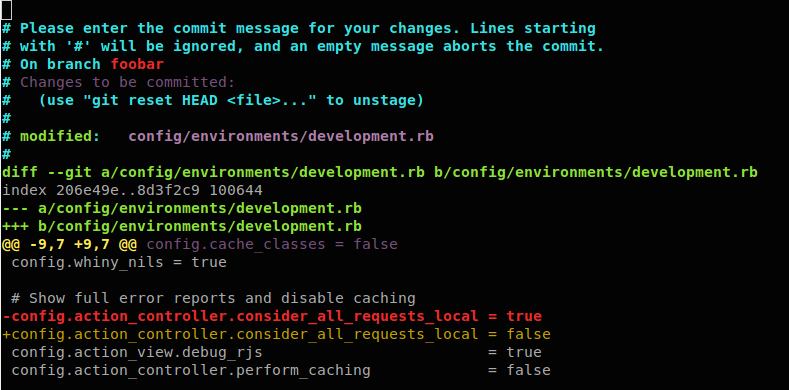
The best that help break my timidness in vim was writing my commit messages us the vim IDE. The common way of commit work is using `git commit -m`, but I recently found out about `git commit -v` from an upcase video; Rather than set your message per commit, you are able view the `git diff` and add a commit message while viewing what you changed.
I highly recommend viewing the diff before you create commits, it will help you catch misspellings and prevent debuggers from getting in a pull request.
Thursday, October 2, 2014
Teaching Github to College Kids
I recently had the opportunity to teach a group of UCF Engineering/Computer Science students how to use git. There is an organization called Engineers Without Borders at the University of Central Florida in Orlando; The president of the organization reached out to a coworker of mine to teach them about Github. My coworker was unable to attend and threw it out there to the team and of course I had to accept.
I truly enjoy teaching others and love taking the opportunity when ever I can.
The meeting was on Monday of this week and I spent the weekend preparing a short slide show on the topic. My understanding that the students need to know how to use git and Github in order to collaborate on group code projects.
The group of about 40 kids were mixed with all different types of engineering backgrounds, some with experience in code and some without.
My approach was to share how git works initially and it's basic commands, Unfortunately the school was not equipped with a thunderbolt to VGA adapter, and I failed to put one of two I owned in my backpacked. So I presented from the limited Windows PC showing git via Nitrous.io, which was quick thinking on my part.
Overall the presentation went ok, despite the technical glitches with the internet. I was actually surprised that a handful (maybe 3-4) of students already knew git and had a github. one student really impressed me and already had a Rails project built (only if I got into to Rails in college, I'd be a baller right now).
Teaching git has actually taught me a few new git commands I have begun using, like `git reflog` which gives you the ability to see all commits on the project. I also learned despite deleting a branch or commits they all live there and are retrievable by their unique commit id.
Remember git saves changes, not files.
I truly enjoy teaching others and love taking the opportunity when ever I can.
The meeting was on Monday of this week and I spent the weekend preparing a short slide show on the topic. My understanding that the students need to know how to use git and Github in order to collaborate on group code projects.
The group of about 40 kids were mixed with all different types of engineering backgrounds, some with experience in code and some without.
My approach was to share how git works initially and it's basic commands, Unfortunately the school was not equipped with a thunderbolt to VGA adapter, and I failed to put one of two I owned in my backpacked. So I presented from the limited Windows PC showing git via Nitrous.io, which was quick thinking on my part.
Overall the presentation went ok, despite the technical glitches with the internet. I was actually surprised that a handful (maybe 3-4) of students already knew git and had a github. one student really impressed me and already had a Rails project built (only if I got into to Rails in college, I'd be a baller right now).
Teaching git has actually taught me a few new git commands I have begun using, like `git reflog` which gives you the ability to see all commits on the project. I also learned despite deleting a branch or commits they all live there and are retrievable by their unique commit id.
Remember git saves changes, not files.
Friday, September 19, 2014
Why I am using git flow and you should too
I have learned many things in only 3 months real Rails Engineer(not just on tv) and I have been a slacking a bit on sharing those skills due to the increase workload I continue to take on. I did want to take the time and share on `git flow` and why I am using it on my overhaul of my breakable toy app, Chuych.
While attempting to work on my chuych app in the past 3 months I have notice that my commits are a bit all over the place and I lack the focus to complete anyone thing, for example sticking to one design. This is why I have taken it upon my self to use git flow (What is git?).
My goal has been to give my personal projects more of a focus lately since they have been ignored. I spent a lot of time trying to get up to speed in Ruby, Javascript, and even learn iOS on the side. I can say I really lost focus on maintaining my own code portfolio. I have however been taking work home and spend a couple hours on the weekend working through refactoring and bug tracking in my work code.
I have slowed down on my learning of new skills and languages and restricting myself to only learning things that will increase my productivity at work and make my chuych app more robust (This will not effect my iOS learning). I have spent the past 2 weekends building out my test suite and it is at a point where I can no just add test when I implement new things.
Git flow is feature of git where you can speed up your workflow, in the command line, by creating structure in your branches/commits with shortcuts. This feature will create a branch, merge a branch, and close a pull request in 2 commands. It is not uncommon for someone to work on their personal app and commit and push everything on their master branch. There is no shame in this if you do so; I was doing this up until last month. I am now using git flow to create separate branches to organize my thoughts and focus on one feature/fix at a time. This really helped me finish the last of my testing and will hopefully help me build out my design stylesheets.
If you learned rails through any tutorial they team you to commit as soon as you are done with a full feature or full programming thought. They sometimes briefly teach you about branches, but from my recollection, it gets abandoned rather quickly in the tutorial, or at least I abandoned it. It really isn't necessary to be so verbose in your branching your commits, but for apps you would like to keep around for awhile, structure is what will keep your sanity.
My recommendation is to try using `git flow` for one feature of your site, if you are not already using a similar method, it will bring sanity back to your app development just as it has mine.
The Process:
To begin you will need at least 2 branches created in your app. I named one master and the other develop, but feel to use any naming convention.
Master Branch - This branch is standard, especially using github and coming from tutorials. I believe most Rails developers and even possible back-end git users use this branch name. If you are using heroku or another deploying method, it can be deployed from here.
Develop Branch - This is the branch where all you code will be merged to first and tested.
It is important to keep master separate in case you merge a breaking changes or something goes wrong, the merge history should be primarily merges from develop unless its a hotfix (to be explained later).
You can also create staging, release, and QA branches but I am keeping it simple for now and suggest the same.
Install:
There are complete git flow installation instructions on the web but I will provide the cliff notes.
Start by type `git flow init` in the command line and proceeding with the steps prompted in your terminal. They will ask what branch your feature will be merged to, my recommendation is to use the defaults on the screen and the develop branch to merge to.
Workflow:
Again there are many workflow examples on the web but I will provide the cliff notes.
In my current we follow the current structure.
*a hotfix is a pressing bug that will actually be merged to the master branch instead of the develop first. You will create these off master and follow the same steps 2-4.
Why:
So why do it this way? My answer is again to stay focused on feature at a time; it will also help when I actually get my app built out, I can work on multiple feature at a time if I get stuck or choose to work with another developer. I also will start using release cycles once my app hits 1.0 (i.e. has some sort of front end design).
If you are reading this and still learning rails in hopes to get a job doing it, I recommend trying this out, if it doesn't work for you, you can always delete the extra branches continue to push changes directly to master. If you do decide to do this, it would help you in the eventual interview since most companies use this or a similar technique in the development.
If you have questions or if something was unclear, please shoot me an email or leave a comment.

While attempting to work on my chuych app in the past 3 months I have notice that my commits are a bit all over the place and I lack the focus to complete anyone thing, for example sticking to one design. This is why I have taken it upon my self to use git flow (What is git?).
My goal has been to give my personal projects more of a focus lately since they have been ignored. I spent a lot of time trying to get up to speed in Ruby, Javascript, and even learn iOS on the side. I can say I really lost focus on maintaining my own code portfolio. I have however been taking work home and spend a couple hours on the weekend working through refactoring and bug tracking in my work code.
I have slowed down on my learning of new skills and languages and restricting myself to only learning things that will increase my productivity at work and make my chuych app more robust (This will not effect my iOS learning). I have spent the past 2 weekends building out my test suite and it is at a point where I can no just add test when I implement new things.
Git flow is feature of git where you can speed up your workflow, in the command line, by creating structure in your branches/commits with shortcuts. This feature will create a branch, merge a branch, and close a pull request in 2 commands. It is not uncommon for someone to work on their personal app and commit and push everything on their master branch. There is no shame in this if you do so; I was doing this up until last month. I am now using git flow to create separate branches to organize my thoughts and focus on one feature/fix at a time. This really helped me finish the last of my testing and will hopefully help me build out my design stylesheets.
If you learned rails through any tutorial they team you to commit as soon as you are done with a full feature or full programming thought. They sometimes briefly teach you about branches, but from my recollection, it gets abandoned rather quickly in the tutorial, or at least I abandoned it. It really isn't necessary to be so verbose in your branching your commits, but for apps you would like to keep around for awhile, structure is what will keep your sanity.
My recommendation is to try using `git flow` for one feature of your site, if you are not already using a similar method, it will bring sanity back to your app development just as it has mine.
The Process:
To begin you will need at least 2 branches created in your app. I named one master and the other develop, but feel to use any naming convention.
Master Branch - This branch is standard, especially using github and coming from tutorials. I believe most Rails developers and even possible back-end git users use this branch name. If you are using heroku or another deploying method, it can be deployed from here.
Develop Branch - This is the branch where all you code will be merged to first and tested.
It is important to keep master separate in case you merge a breaking changes or something goes wrong, the merge history should be primarily merges from develop unless its a hotfix (to be explained later).
You can also create staging, release, and QA branches but I am keeping it simple for now and suggest the same.
Install:
There are complete git flow installation instructions on the web but I will provide the cliff notes.
Start by type `git flow init` in the command line and proceeding with the steps prompted in your terminal. They will ask what branch your feature will be merged to, my recommendation is to use the defaults on the screen and the develop branch to merge to.
Workflow:
Again there are many workflow examples on the web but I will provide the cliff notes.
In my current we follow the current structure.
- Create a feature branch `git flow feature start <desired_feature_name>` while on the develop branch. What ever branch you are on will create the new feature branch, so make sure you are on the correct one.
- Push the branch to git `git push origin <new_feature_branch_name>` this will create the branch on github, be sure your git remote is set or you will be prompted the first time.
- Open pull request, on github you can use create a pull request compared to develop for peer code review. Instructions on creating a pull request.
- After feature is complete `git flow feature finish <chosen_feature_name>` this will merge your branch to develop and delete your feature branch locally only.
- Now the final can be of your choosing, but you eventually need to merge to master and then deploy once tested. At work we would now create a release branch using `git flow release <release_number>` and repeat steps 2-4, replacing the final merge to master instead of develop.
*a hotfix is a pressing bug that will actually be merged to the master branch instead of the develop first. You will create these off master and follow the same steps 2-4.
Why:
So why do it this way? My answer is again to stay focused on feature at a time; it will also help when I actually get my app built out, I can work on multiple feature at a time if I get stuck or choose to work with another developer. I also will start using release cycles once my app hits 1.0 (i.e. has some sort of front end design).
If you are reading this and still learning rails in hopes to get a job doing it, I recommend trying this out, if it doesn't work for you, you can always delete the extra branches continue to push changes directly to master. If you do decide to do this, it would help you in the eventual interview since most companies use this or a similar technique in the development.
If you have questions or if something was unclear, please shoot me an email or leave a comment.
Tuesday, September 16, 2014
Editing a commit after the fact
Multiple times I have found myself in need of editing my commit messages due to typos or unclear messages. I have that the use of `git commit --amend` and `git reset -- hard`.
Having a short and concise commits have been useful for myself, especially I have had to start and my feature stories multiple times during the course of the month.
Another practice in reading code to learn is reading each commit(line by line) to get a good understanding on what the code is doing. Reading commit messages on code that you have no association with could feel as an unneeded experience, but my recommendation is to do so to grasp a better understanding of the code in general.
*update* If the terminal is your default way of using git then you will need to know enough VIM to navigate. I recommend vimtutor or vim adventures. Of course you could always use the github GUI but thats doesn't feel like coding :)
Having a short and concise commits have been useful for myself, especially I have had to start and my feature stories multiple times during the course of the month.
Another practice in reading code to learn is reading each commit(line by line) to get a good understanding on what the code is doing. Reading commit messages on code that you have no association with could feel as an unneeded experience, but my recommendation is to do so to grasp a better understanding of the code in general.
*update* If the terminal is your default way of using git then you will need to know enough VIM to navigate. I recommend vimtutor or vim adventures. Of course you could always use the github GUI but thats doesn't feel like coding :)
Tuesday, July 1, 2014
Rails Panel and Better Errors
I was told of another pretty nice tool to help in working with the legacy code at work. I find that trying to figure out where I am at in the app while debugging errors to be difficult. The main reason is due to the templates being named very similarly from page to page.

Chrome comes with an element inspector which works similar to rails panel to debug front end issues and discover the actual names of items in the asset pipeline. I am still very much a novice when it comes to working with assets and templates, and find it very helpful to be able to see the page interaction and found it very useful to write integration tests.
Another great tool is the Better Errors (you can debug in the browser!) that is used at work and both are explained in this short Railscast.
I am extremely blessed to be able to learn and use these new tools everyday and looking forward to sharing new tools as I learn them.
`git checkout --`
Another quick tips I wanted to add was the use of `git checkout`. Most people might know that `git checkout . ` can be used to clear all changes to your code to your last git commit. I have found it very useful to practice writing code without any fear of breaking something, I can also revert back to the original state of the code if I mess things bad, but sometime I find I inadvertently make changes to files that I do not commit.
For example I sometime change the spacing of a file of play in a file while doing testing that does not need to be merged to the project. Instead of reverting to the original state of the code using the `period`. This week I started using `git checkout -- <filename>`, which only reverts that file.
I am sure I saw/used this tool before or maybe used it in a Code School video, but I have yet to use it till now and felt like I could share. so if you find yourself going through the Hartl tutorial and stuck on error, rather than starting completely over, just `checkout` the files.
Thanks for reading
Chrome comes with an element inspector which works similar to rails panel to debug front end issues and discover the actual names of items in the asset pipeline. I am still very much a novice when it comes to working with assets and templates, and find it very helpful to be able to see the page interaction and found it very useful to write integration tests.
Another great tool is the Better Errors (you can debug in the browser!) that is used at work and both are explained in this short Railscast.
I am extremely blessed to be able to learn and use these new tools everyday and looking forward to sharing new tools as I learn them.
`git checkout --`
Another quick tips I wanted to add was the use of `git checkout`. Most people might know that `git checkout . ` can be used to clear all changes to your code to your last git commit. I have found it very useful to practice writing code without any fear of breaking something, I can also revert back to the original state of the code if I mess things bad, but sometime I find I inadvertently make changes to files that I do not commit.
For example I sometime change the spacing of a file of play in a file while doing testing that does not need to be merged to the project. Instead of reverting to the original state of the code using the `period`. This week I started using `git checkout -- <filename>`, which only reverts that file.
I am sure I saw/used this tool before or maybe used it in a Code School video, but I have yet to use it till now and felt like I could share. so if you find yourself going through the Hartl tutorial and stuck on error, rather than starting completely over, just `checkout` the files.
Thanks for reading
Monday, April 21, 2014
My first pull request to an open source project
So I have actually never completed a pull request until tonight. I spent a good amount of time trying to troubleshoot why I could not simple push and pull my request. But after some help from a @hopefulwebdev I was able to complete my first pull to an open source project, which isn't exactly on my list of things to do, but it was in the back of my mind.
See my pull here
Here are the steps.
1. Fork the project. You definitely don't want to go messing things up on the main project folder.
2. On the master branch, you want to pull the most updated files in order to make sure all contributors are working on the most recent instance of the project.
=$ git pull upstream
3. In order to make changes, a feature branch is recommend to be made. This will help keep documentation organized.
=$ git checkout -b <feature_branch>
4. Finally make your changes and push the files to github
=$ git push -u origin <feature_branch>
5. Once pushed in Github land, the green pull request button will be available to compare, merge, and leave comments.
Now knowing this is half the battler. go and contribute!
Is there anything I missed?
See my pull here
Here are the steps.
1. Fork the project. You definitely don't want to go messing things up on the main project folder.
2. On the master branch, you want to pull the most updated files in order to make sure all contributors are working on the most recent instance of the project.
=$ git pull upstream
3. In order to make changes, a feature branch is recommend to be made. This will help keep documentation organized.
=$ git checkout -b <feature_branch>
4. Finally make your changes and push the files to github
=$ git push -u origin <feature_branch>
5. Once pushed in Github land, the green pull request button will be available to compare, merge, and leave comments.
Now knowing this is half the battler. go and contribute!
Is there anything I missed?
Subscribe to:
Posts (Atom)